osint skill - User Guide
AI-powered Open Source Intelligence collection and analysis.
Overview
The osint skill provides structured workflows for gathering and analyzing publicly available information. All findings are persisted through the skill's memory adapter — MuninnDB MCP when available, a local osint-findings/ log otherwise — for future reference and cross-investigation linking.
Key Capability: Iterative Pivot-Driven Investigations - The Investigation Orchestrator automatically expands collection as new intelligence is discovered, following leads across entity types (username → email → domain → company → personnel).
Getting Started
Prerequisites
None. The skill is self-contained and every workflow degrades gracefully. Optional backends improve depth:
- MuninnDB MCP - Persistent findings memory (preferred; falls back to a local
osint-findings/log) - Bright Data MCP - Bot-walled or heavily scraped sources (falls back to WebSearch/WebFetch)
- Browser automation skill - JS-heavy sites and screenshots (those sources are skipped without it)
Basic Usage
Simply describe what you want to investigate:
The skill will automatically route to the appropriate workflow.
Investigation Orchestrator (Iterative Pivot-Driven)
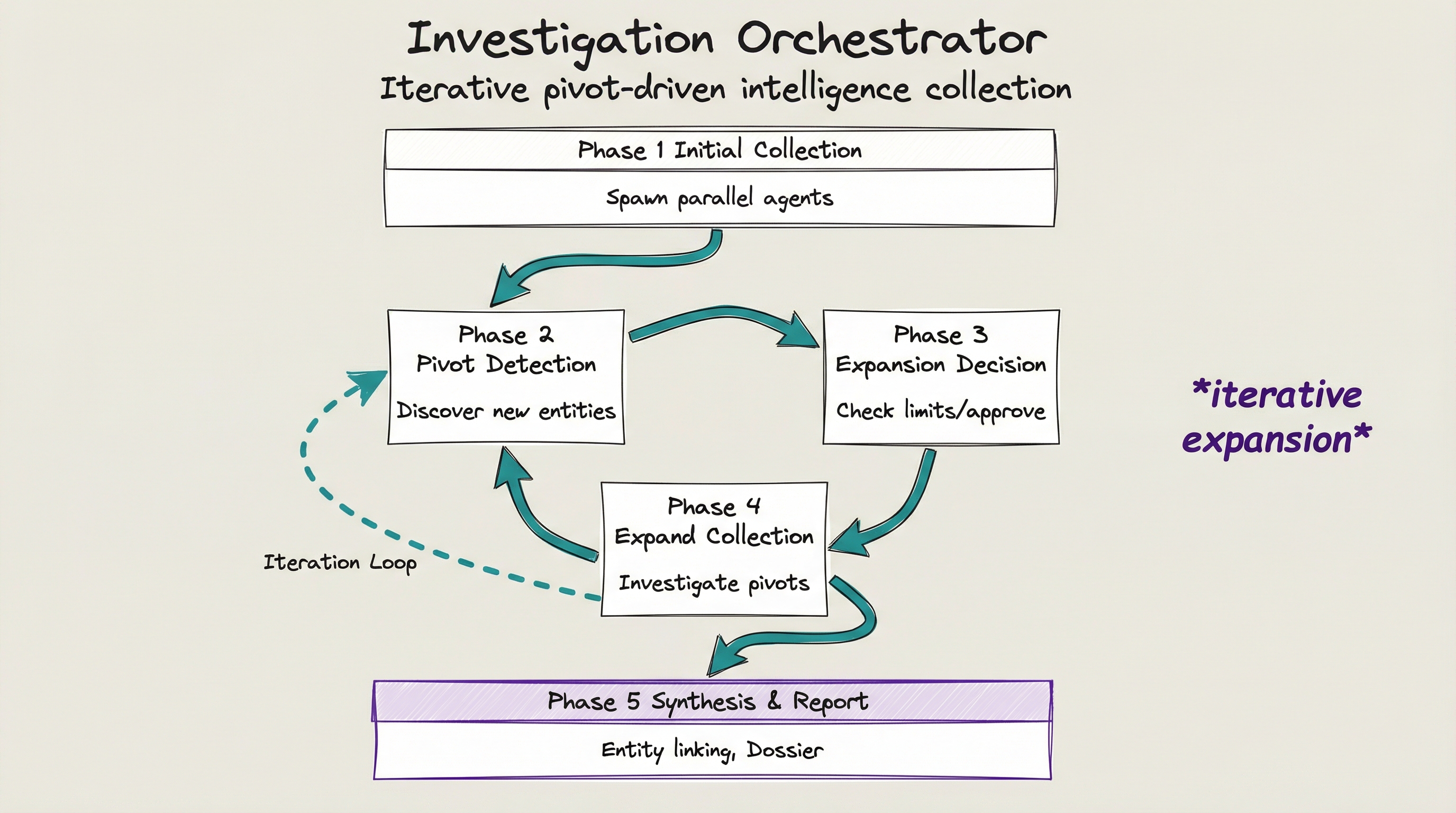
The Investigation Orchestrator is the most powerful workflow in the OSINT skill. It automatically expands collection as new intelligence is discovered, creating a comprehensive intelligence picture.
What Makes It Different
| Standard Workflow | Investigation Orchestrator |
|---|---|
| Single target, single workflow | Auto-expands to related entities |
| Manual follow-up on leads | Automatic pivot detection |
| One-shot collection | Iterative depth exploration |
| Results in isolation | Builds entity relationship graph |
How It Works
PHASE 1: Initial Collection
├── Spawn parallel agents for initial target
├── UsernameRecon, SocialCapture, DomainRecon, etc.
└── Collect all available intelligence

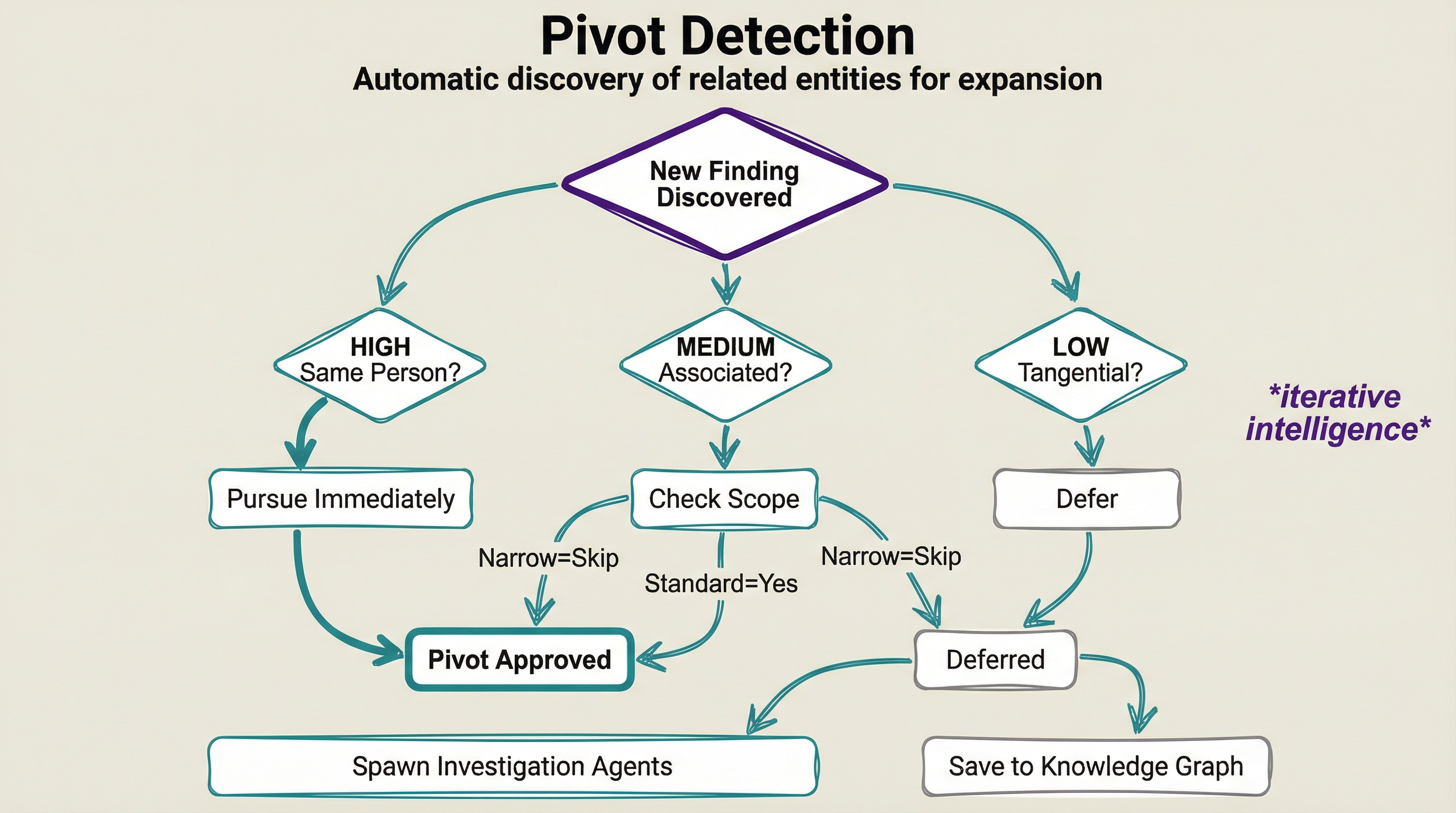
PHASE 2: Pivot Detection
├── Analyze findings for new entities
├── Email addresses, domains, companies, real names
└── Prioritize: HIGH (same person), MEDIUM (associated), LOW (tangential)

PHASE 3: Expansion Decision
├── Check depth/entity limits
├── Interactive mode: Present pivots for approval
└── Auto mode: Pursue based on priority and scope

PHASE 4: Expand Collection (repeat until limits)
├── Spawn agents for approved pivots
├── Return to pivot detection
└── Build deeper intelligence

PHASE 5: Synthesis & Report
├── Entity linking and correlation
├── Timeline analysis
└── Comprehensive dossier generation
Invocation Examples
Basic investigation (auto mode):
Deep investigation with wide scope:
Interactive mode (approve each pivot):
Company investigation:
Resume a previous investigation:
Parameters
| Parameter | Default | Description |
|---|---|---|
max_depth |
2 | Maximum pivot hops from original target |
max_entities |
50 | Stop when this many entities discovered |
scope |
standard | narrow, standard, or wide |
require_approval |
false | Ask before pursuing each pivot |
Scope Levels
| Scope | Pivots Followed | Best For |
|---|---|---|
| narrow | HIGH priority only | Quick identity verification |
| standard | HIGH + MEDIUM priority | General investigations |
| wide | All priorities | Comprehensive threat analysis |
Interactive Pivot Approval
When require_approval is enabled, you'll see pivot opportunities:
┌─────────────────────────────────────────────────────────────────┐
│ PIVOT OPPORTUNITIES DETECTED                                     │
├─────────────────────────────────────────────────────────────────┤
│ HIGH PRIORITY:                                                   │
│ [1] Email: john@example.com (from GitHub profile)                │
│ [2] Real Name: "John Doe" (from LinkedIn)                        │
│                                                                  │
│ MEDIUM PRIORITY:                                                 │
│ [3] Company: "Acme Corp" (employer)                              │
│ [4] Domain: johndoe.dev (from Twitter bio)                       │
└─────────────────────────────────────────────────────────────────┘

Options:
  • "pursue 1,2,4" - Investigate these now
  • "defer 3"      - Save for later investigation
  • "pursue all"   - Investigate all pivots
  • "done"         - Skip remaining, proceed to synthesis
Deferred Leads
Leads that aren't pursued are stored via the memory adapter (in the investigation's group) for later:
- Reason tracking: Why it was deferred (depth limit, user choice, scope)
- Context preserved: What investigation discovered it
- Resume capability: Continue investigation anytime
To view deferred leads:
To pursue deferred leads:
Resume investigation OSINT-INV-2026-001, pursue deferred leads
Investigate deferred pivot colleague@acme.com
Workflow Categories
Iterative Pivot-Driven (Recommended for Complex Investigations)
| Workflow | Use When | Example |
|---|---|---|
| InvestigationOrchestrator | Full investigation with auto-expansion | "Deep dive on johndoe, follow the leads" |
Individual/Person Research
| Workflow | Use When | Example |
|---|---|---|
| UsernameRecon | Finding accounts across platforms | "Find all accounts for username hackerman" |
| SocialCapture | Capturing social media profiles | "Capture Twitter profile @elonmusk" |
| TargetProfile | Comprehensive individual dossier | "Full profile on John Smith" |
| TimelineAnalysis | Analyzing activity patterns | "When is this user most active?" |
Domain/Infrastructure
| Workflow | Use When | Example |
|---|---|---|
| DomainRecon | Investigating websites/domains | "Investigate example.com" |
| InfraMapping | Mapping network infrastructure | "Map infrastructure for 10.0.0.0/24" |
Company/Business Research
| Workflow | Use When | Example |
|---|---|---|
| CompanyProfile | Full company investigation | "Research Acme Corporation" |
| CorporateStructure | Ownership and hierarchy | "Who owns XYZ Inc?" |
| FinancialRecon | Funding, investors, financials | "What's the financial status of TechCorp?" |
| CompetitorAnalysis | Market position, competitors | "Analyze competitors for Acme" |
| RiskAssessment | Due diligence, litigation, sanctions | "Run risk check on vendor ABC" |
Digital Artifacts
| Workflow | Use When | Example |
|---|---|---|
| EmailRecon | Email investigation, breach checking | "Email lookup john@example.com" |
| PhoneRecon | Phone number validation | "Phone lookup +1-555-123-4567" |
| ImageRecon | Image metadata, forensics | "Analyze this image for EXIF data" |
Analysis & Reporting
| Workflow | Use When | Example |
|---|---|---|
| EntityLinking | Connecting identities/accounts | "Link these accounts together" |
| IntelReport | Generating final reports | "Generate report for investigation Alpha" |
Quick Commands
# Investigation Orchestrator (Iterative Pivot-Driven)
/osint investigate <target>              # Full investigation with auto-expansion
/osint deepdive <target>                 # Deep dive, follow all leads
/osint investigate <target> --interactive  # Approve each pivot manually
/osint resume <investigation-id>         # Resume previous investigation

# Individual/Username
/osint username <username>      # Username enumeration
/osint social <@handle>         # Social media capture
/osint profile <target>         # Full target profile
/osint timeline <target>        # Activity timeline

# Domain/Infrastructure
/osint domain <domain>          # Domain reconnaissance
/osint infra <IP/range>         # Infrastructure mapping

# Company Research
/osint company <name>           # Full company profile
/osint structure <name>         # Corporate ownership
/osint financials <name>        # Financial reconnaissance
/osint competitors <name>       # Competitive analysis
/osint risk <name>              # Risk/due diligence

# Digital Artifacts
/osint email <email>            # Email investigation
/osint phone <number>           # Phone lookup
/osint image <path>             # Image forensics

# Analysis & Reporting
/osint link <entity1> <entity2> # Entity linking
/osint report <investigation>   # Generate report
Output
All investigations produce:
- Structured Report - Formatted findings displayed in the conversation
- Persisted Memory - Findings stored via the memory adapter (MuninnDB group, or
./osint-findings/<group>.mdon the local-log path) for querying and resume - Entity links - Related findings connected so future investigations can pivot on them
Querying Past Investigations
With MuninnDB (Path 1), recall previous findings by group tag:
On the local-log path (Path 2), read the group file:
Scope Levels
Many workflows support scope levels:
| Level | Description | Time |
|---|---|---|
| light | Basic identification, key facts only | ~10 min |
| standard | Core analysis, moderate depth | ~25 min |
| comprehensive | Full investigation, all sub-workflows | ~45+ min |
Example:
Ethical Guidelines
Before any OSINT operation:
- Verify Authorization - Ensure you have legitimate purpose
- Check Legal Boundaries - Respect privacy laws and platform ToS
- Maintain OPSEC - Use appropriate anonymization if needed
- Document Everything - Maintain audit trail of collection methods
- Store Securely - Protect collected intelligence appropriately
Confidence Levels
All findings include confidence ratings:
| Level | Meaning |
|---|---|
| Confirmed | Verified from official/authoritative source |
| High | Multiple corroborating sources |
| Medium | Single reliable source or inference |
| Low | Unverified, requires confirmation |
Next Steps
- Iterative Investigations: Use
deep dive on <target>for comprehensive pivot-driven analysis - See COMPANY_RESEARCH.md for detailed company investigation guide
- See QUICK_REFERENCE.md for command cheat sheet
- See CHANGELOG.md for version history and release notes
Pro Tips
- Start with Investigation Orchestrator for any complex investigation - it automatically discovers related entities
- Use interactive mode (
require_approval=true) when you want control over which leads to pursue - Wide scope is best for threat analysis; narrow scope for quick identity verification
- Resume investigations to continue from deferred leads without losing context
- All findings persist through the memory adapter - query past investigations anytime