Memory Decay & Lifecycle Management
The Madeinoz Knowledge System includes an intelligent memory decay and lifecycle management system (Feature 009) that automatically prioritizes important memories, allows stale information to fade, and maintains sustainable graph growth over time.
Overview
Why Memory Decay Matters
Without decay management, your knowledge graph would accumulate every piece of information indefinitely, leading to:
- Bloated search results - Trivial temporary information crowds out important knowledge
- Degraded performance - More memories = slower queries and higher costs
- Stale data prominence - Old, irrelevant memories appear alongside current information
Memory decay solves this by automatically:
- Prioritizing important memories in search results
- Fading unused, unimportant information over time
- Archiving or deleting stale memories to maintain graph health
Key Concepts
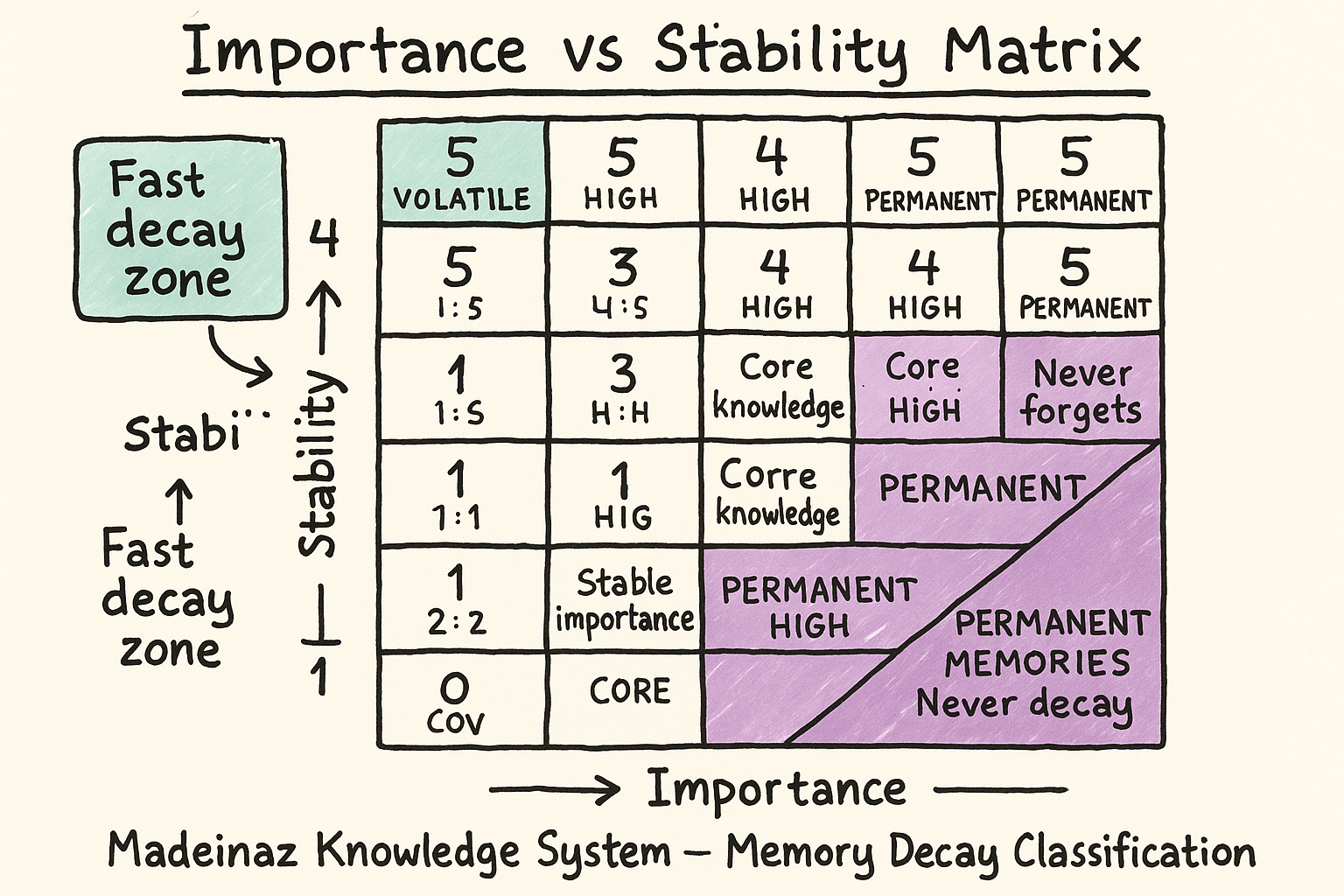
Importance Classification (1-5)
Every memory is assigned an importance score at ingestion time:
| Level | Name | Description | Examples |
|---|---|---|---|
| 5 | CORE | Fundamental to your identity or work | "I am allergic to shellfish", "My name is Stephen" |
| 4 | HIGH | Important to your current projects | "Working on payment feature this sprint", "Team uses TypeScript" |
| 3 | MODERATE | General knowledge, default | "Prefers dark mode", "Uses VS Code" |
| 2 | LOW | Useful but replaceable | "Read an article about Rust", "Tried a new library" |
| 1 | TRIVIAL | Ephemeral, can forget quickly | "Weather was nice today", "Had coffee at 9am" |
How it works
- The LLM analyzes the content and context during ingestion
- Default fallback:
3(MODERATE) if LLM unavailable - Higher importance = slower decay, prioritized in search
LLM Central Tendency Bias
Problem: All LLMs exhibit a well-documented "central tendency bias" or "neutrality bias" - they systematically avoid extreme ratings and cluster toward middle options (like rating everything as importance=3/MODERATE).
Research findings: - This bias affects all LLM models regardless of provider - RLHF (Reinforcement Learning from Human Feedback) can exacerbate the problem by pushing models toward over-neutralization - Without intervention, most content gets rated as 3/3 regardless of actual importance
Our mitigation: The classification prompt uses forced-choice techniques to overcome this bias: - Explicit instructions to avoid neutral ratings - Decision framework forcing 2/4 choices over default 3 - Specific examples for each importance level with test questions - "When in doubt, choose 2 or 4" reinforcement
Results: With forced-choice prompting: - SSN → 5/5 (correctly identified as CORE) - "Wonder about weather" → 1/1 (correctly identified as TRIVIAL) - "Paris is capital of France" → 2/5 (correctly identified as LOW but permanent)
References: - Prompt Perturbations Reveal Human-Like Biases in LLMs - FadeMem: Biologically-Inspired Forgetting - Quantifying and Mitigating Label Bias in LLMs
Stability Classification (1-5)
Every memory is assigned a stability score predicting how likely it is to change:
| Level | Name | Description | Examples |
|---|---|---|---|
| 5 | PERMANENT | Never changes | "Birth date", "Education history" |
| 4 | HIGH | Rarely changes (months/years) | "Home address", "Job title" |
| 3 | MODERATE | Changes occasionally (weeks/months) | "Current project", "Team structure" |
| 2 | LOW | Changes regularly (days/weeks) | "Current sprint goals", "Reading list" |
| 1 | VOLATILE | Changes frequently (hours/days) | "Today's meeting notes", "Current task" |
How it works
- The LLM predicts volatility based on content type
- Default fallback:
3(MODERATE) if LLM unavailable - Higher stability = longer half-life, slower decay
Decay Score (0.0-1.0)
The decay score represents how "stale" a memory has become:
- 0.0 = Fresh (recently accessed or created)
- 0.5 = Somewhat stale
- 1.0 = Fully decayed (should be archived or deleted)
Calculation
The decay score uses exponential decay (not linear), matching how human memory and real-world phenomena work:
Why exponential?
- Linear decay would lose value at constant rate (e.g., 0.56% per day), reaching 100% after 180 days
- Exponential decay follows natural patterns:
- Radioactive decay
- Drug elimination from the body
- Human memory forgetting (Ebbinghaus curve)
- Information relevance over time
Exponential vs Linear Decay (180-day half-life)
Linear decay (constant 0.56% per day): - Day 0: 0% decay - Day 90: 50% decay - Day 180: 100% decay (completely gone)
Exponential decay (our implementation): - Day 0: 0% decay - Day 30: 11% decay - Day 90: 29% decay - Day 180: 50% decay (half-life) - Day 360: 75% decay - Day 540: 87.5% decay - Never truly reaches 100%
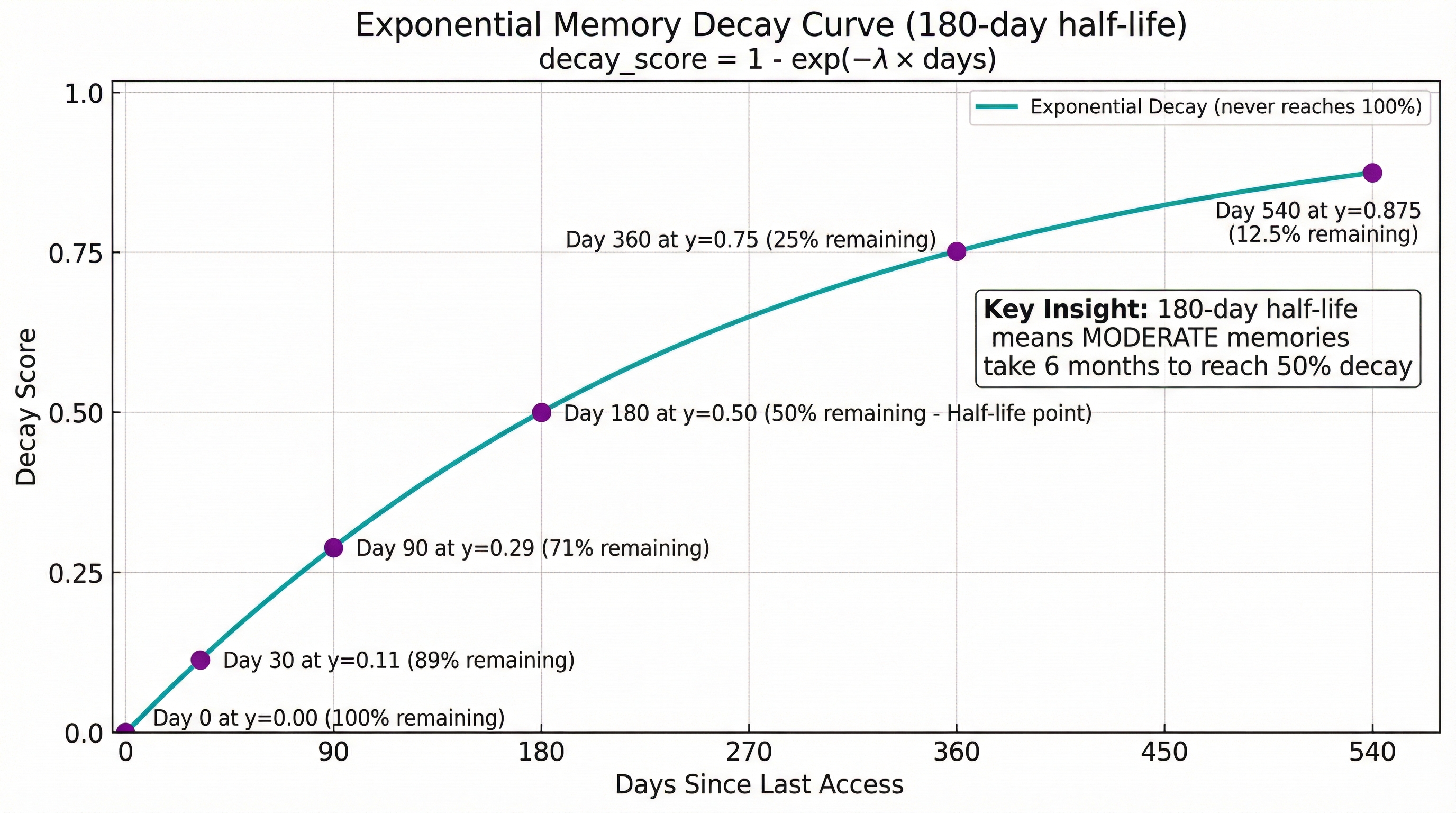
Decay progression by half-life:
| Half-Lives | Decay Score | Remaining Value |
|---|---|---|
| 0 | 0.00 | 100% (fresh) |
| 1 | 0.50 | 50% |
| 2 | 0.75 | 25% |
| 3 | 0.875 | 12.5% |
| 4 | 0.9375 | 6.25% |
| 5 | 0.96875 | 3.125% |
| 6 | 0.9844 | 1.56% |
Impact of stability on half-life:
The stability level adjusts the half-life:
| Stability | Half-Life | Days to 75% Decay | Days to 87.5% Decay |
|---|---|---|---|
| 1 (VOLATILE) | 60 days | 120 | 180 |
| 2 (LOW) | 120 days | 240 | 360 |
| 3 (MODERATE) | 180 days | 360 | 540 |
| 4 (HIGH) | 240 days | 480 | 720 |
| 5 (PERMANENT) | ∞ | Never | Never (λ = 0) |
Key Insight
Exponential decay means memories lose value quickly at first, then decay slows down over time. This preserves older memories that have proven valuable (high stability) while allowing trivial information to fade rapidly.
Lifecycle States
Memories transition through 5 lifecycle states based on decay score and time inactive:
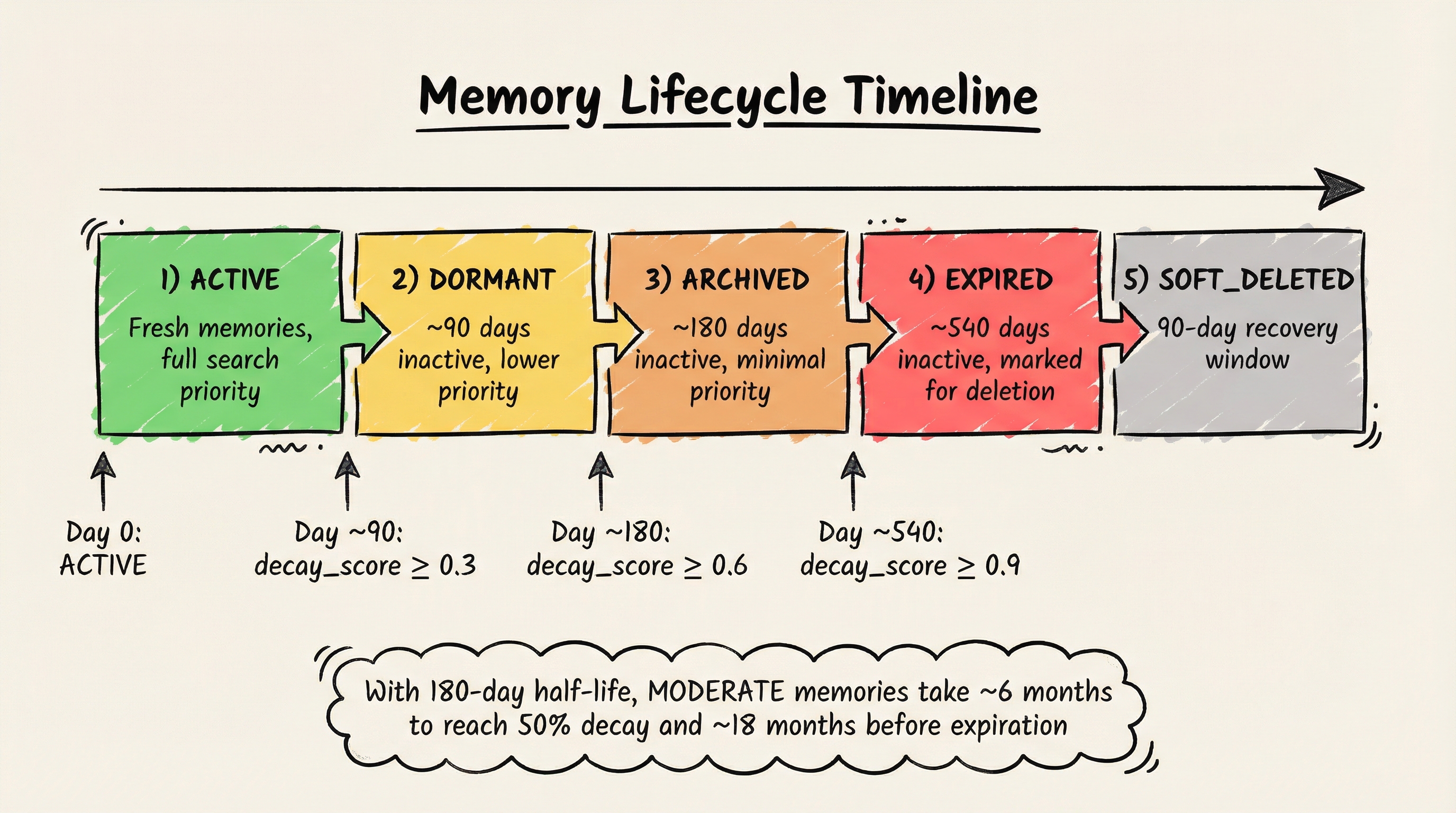
| State | Description | Search Behavior | Recovery |
|---|---|---|---|
| ACTIVE | Recently accessed, full relevance | Ranked normally | N/A |
| DORMANT | Not accessed for 90+ days | Lower priority | Auto-reactivates on access |
| ARCHIVED | Not accessed for 180+ days | Much lower priority | Auto-reactivates on access |
| EXPIRED | Not accessed for 360+ days | Excluded from search | Manual recovery only |
| SOFT_DELETED | Deleted, 90-day recovery window | Hidden from search | Admin recovery within 90 days |
Permanent memories exempt: Importance ≥4 AND Stability ≥4 = PERMANENT (never decays)
Weighted Search Results
Primary Benefit
The main user-facing benefit of memory decay is better search results.
Without decay: Results ranked purely by semantic similarity With decay: Results ranked by semantic relevance (60%) + recency (25%) + importance (15%)
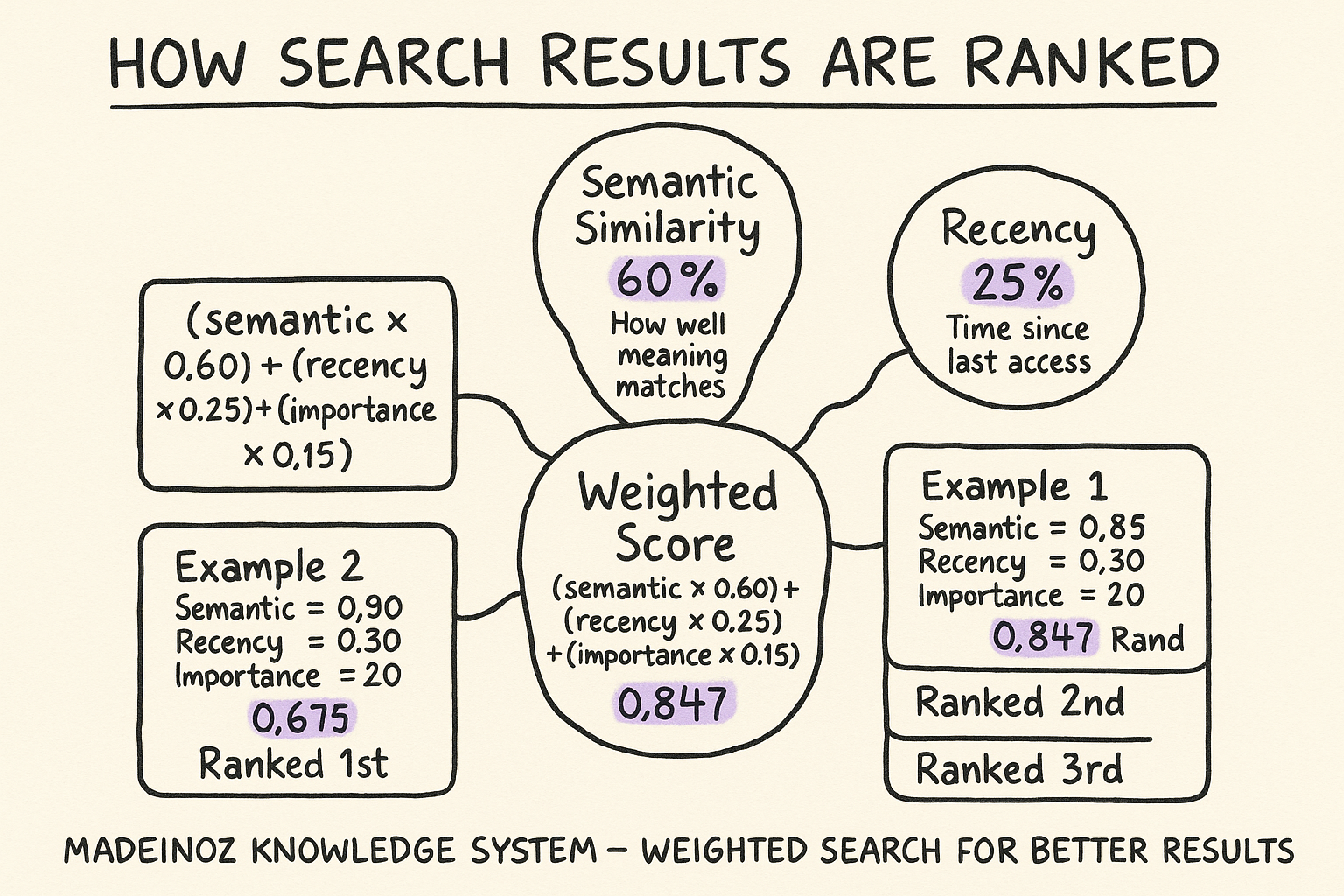
How Search Ranking Works
When you search for knowledge, results are scored using:
Example:
| Memory | Semantic | Recency | Importance | Weighted Score | Rank |
|---|---|---|---|---|---|
| "Project architecture" | 0.85 | 0.90 | 0.80 (HIGH) | 0.8475 | 1st |
| "Random blog post" | 0.90 | 0.30 | 0.20 (LOW) | 0.6200 | 2nd |
| "Today's weather" | 0.95 | 0.95 | 0.20 (TRIVIAL) | 0.7150 | 3rd |
Even though "Today's weather" has the highest semantic similarity (0.95), the "Project architecture" memory ranks first because it combines good semantic match with high importance and reasonable recency.
Configuring Search Weights
Edit config/decay-config.yaml:
decay:
  weights:
    semantic: 0.60    # Vector similarity weight
    recency: 0.25     # Temporal freshness weight
    importance: 0.15  # Importance score weight
Note: Weights must sum to 1.0. Adjust based on your priorities:
- Want recent stuff more? Increase
recency - Only care about accuracy? Increase
semantic - Always show important stuff? Increase
importance
Lifecycle Management
State Transitions
Memories automatically transition states based on:
- Time inactive (days since last access)
- Decay score (0.0-1.0 scale)
- Importance threshold (some states exempt important memories)
Default thresholds:
| Transition | Criteria |
|---|---|
| ACTIVE → DORMANT | 90 days inactive AND decay_score ≥ 0.3 |
| DORMANT → ARCHIVED | 180 days inactive AND decay_score ≥ 0.6 |
| ARCHIVED → EXPIRED | 360 days inactive AND decay_score ≥ 0.9 AND importance ≤ 3 |
| EXPIRED → SOFT_DELETED | Maintenance runs (automatic) |
Reactivation: Any memory access (search result, explicit retrieval) immediately transitions DORMANT or ARCHIVED memories back to ACTIVE.
Permanent Memory Protection
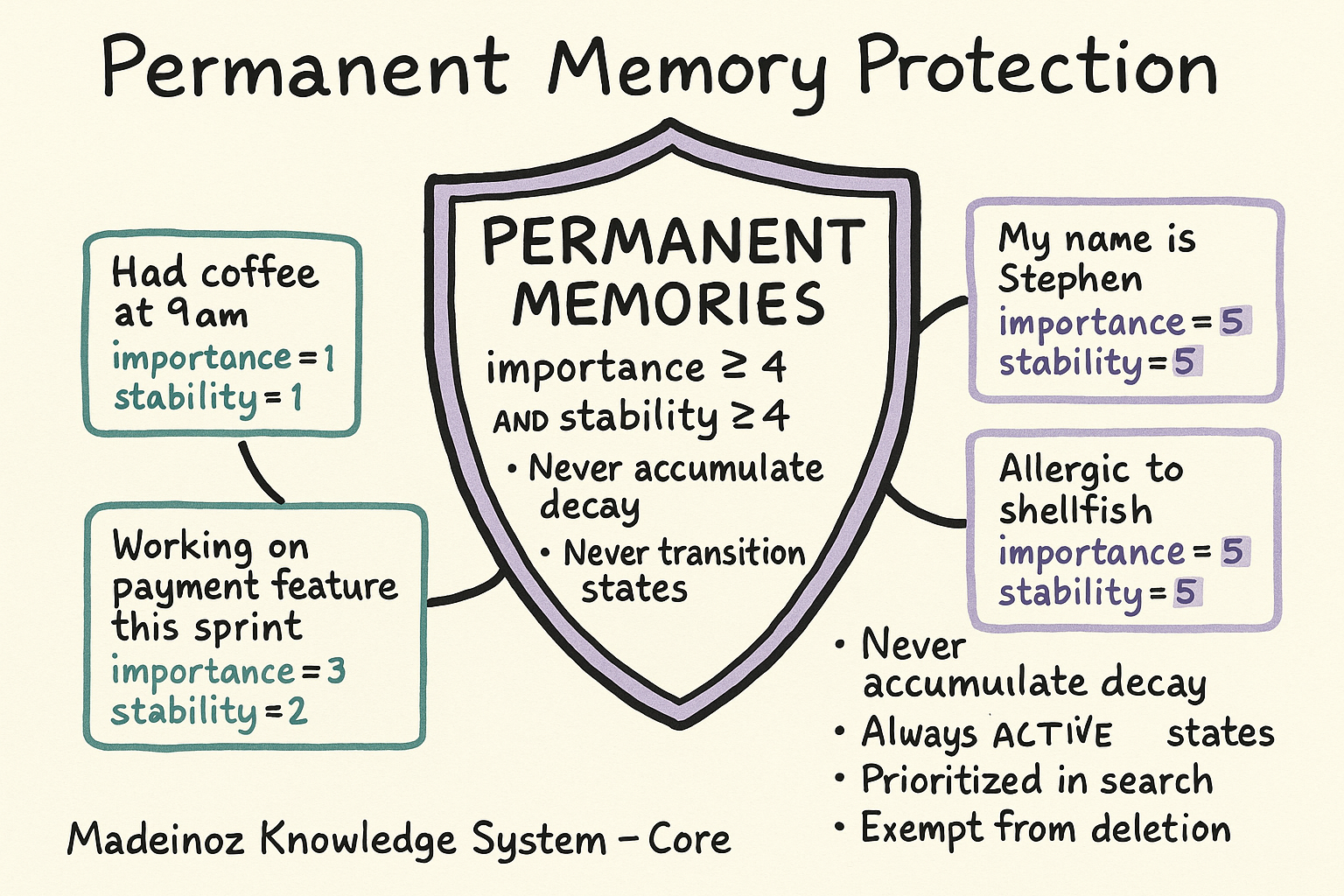
Memories with importance ≥4 AND stability ≥4 are classified as PERMANENT:
- Never accumulate decay (decay_score always 0.0)
- Never transition lifecycle states (always ACTIVE)
- Exempt from archival and deletion
- Prioritized in search results
Use cases
- Core identity information (name, birthdate)
- Critical facts (allergies, medical conditions)
- Permanent career details (profession, degree)
Maintenance Operations
Automatic Maintenance
The system runs automatic maintenance every 24 hours (configurable):
What it does
- Recalculates decay scores for all memories
- Transitions memories between lifecycle states
- Soft-deletes expired memories (with 90-day retention)
- Generates health metrics for Grafana
How to verify
# Check last maintenance run
curl http://localhost:8000/health | jq '.maintenance.last_run_at'

# View maintenance metrics
curl http://localhost:9091/metrics | grep knowledge_decay_maintenance
Manual Maintenance
Trigger maintenance on demand:
# Via MCP tool (if exposed)
{
  "name": "run_maintenance",
  "arguments": {
    "max_duration_minutes": 10
  }
}
What to expect
- Processes memories in batches of 500
- Maximum runtime: 10 minutes (configurable)
- Updates Prometheus metrics throughout
Configuration
Configuration File
Location: config/decay-config.yaml
This file is copied into the Docker container at build time. Rebuild after changes:
# 1. Edit configuration
nano config/decay-config.yaml

# 2. Rebuild Docker image
docker build -f docker/Dockerfile -t madeinoz-knowledge-system:local .

# 3. Restart containers
bun run server-cli stop
bun run server-cli start --dev
Key Configuration Sections
Decay Thresholds
decay:
  thresholds:
    dormant:
      days: 90           # Days before ACTIVE → DORMANT
      decay_score: 0.3   # Decay score threshold
    archived:
      days: 180          # Days before DORMANT → ARCHIVED
      decay_score: 0.6   # Decay score threshold
    expired:
      days: 360          # Days before ARCHIVED → EXPIRED
      decay_score: 0.9   # Decay score threshold
      max_importance: 3  # Only expire if importance ≤ 3
How thresholds work with half-life:
Transitions require BOTH conditions to be met: minimum days inactive AND decay_score threshold.
With the default 180-day half-life for MODERATE memories:
| Transition | Config (minimum) | Actual timing | Decay at minimum days |
|---|---|---|---|
| ACTIVE → DORMANT | 90 days + decay ≥ 0.3 | ~93 days | Day 90: decay ≈ 0.29 |
| DORMANT → ARCHIVED | 180 days + decay ≥ 0.6 | ~238 days | Day 180: decay ≈ 0.50 |
| ARCHIVED → EXPIRED | 360 days + decay ≥ 0.9 | ~598 days | Day 360: decay ≈ 0.75 |
The days threshold is a minimum—actual transitions occur when decay_score reaches the threshold.
Maintenance Schedule
decay:
  maintenance:
    batch_size: 500             # Memories per batch
    max_duration_minutes: 10    # Maximum runtime
    schedule_interval_hours: 24 # Hours between automatic runs (0 = disabled)
Set to 0 to disable automatic maintenance (run manually only).
Search Weights
decay:
  weights:
    semantic: 0.60    # Vector similarity
    recency: 0.25     # Temporal freshness
    importance: 0.15  # Importance score
Monitoring & Observability
Grafana Dashboard
The Memory Decay dashboard provides real-time visibility:
Key Panels:
- Total Memories - Current memory count (excluding soft-deleted)
- Avg Decay Score - Average decay across all memories (0.0 = healthy)
- Maintenance - Shows "Completed" if maintenance ran successfully
- Total Purged - Count of soft-deleted memories permanently removed
- By State - Pie chart showing distribution across lifecycle states
- Avg Scores - Average importance and stability scores
- By Importance - Distribution across importance levels (TRIVIAL → CORE)
Access: http://localhost:3002/d/memory-decay-dashboard (dev)
Health Endpoint
Response:
{
  "status": "healthy",
  "maintenance": {
    "last_run_at": "2026-01-29T14:00:00Z",
    "last_duration_seconds": 45.2,
    "last_run_status": "success"
  },
  "memory_counts": {
    "total": 65,
    "by_state": {
      "ACTIVE": 65,
      "DORMANT": 0,
      "ARCHIVED": 0,
      "EXPIRED": 0
    }
  },
  "decay_metrics": {
    "avg_decay_score": 0.0,
    "avg_importance": 3.0,
    "avg_stability": 3.0
  }
}
Troubleshooting
Memories Decaying Too Fast
Symptom: Important memories becoming DORMANT or ARCHIVED quickly
Solutions:
-
Check importance classification:
-
Adjust decay thresholds:
-
Mark important memories as permanent:
- Edit memory and set importance=4, stability=4
- Or rebuild graph with corrected importance
Maintenance Not Running
Symptom: Grafana shows "Never" for Maintenance status
Solutions:
-
Check schedule configuration:
-
Check MCP server logs:
-
Verify maintenance code loaded:
Poor Search Results
Symptom: Trivial recent results outranking important older ones
Solutions:
-
Adjust search weights:
-
Ensure importance classification is working:
-
Verify decay scores are being calculated:
Advanced Topics
Soft-Delete Recovery
Memories in SOFT_DELETED state can be recovered within 90 days:
# Via Neo4j Browser
MATCH (n:Entity)
WHERE n.attributes.soft_deleted_at IS NOT NULL
  AND datetime() > datetime(n.attributes.soft_deleted_at) + duration('P90D')
RETURN n.name, n.attributes.soft_deleted_at
Recovery process
- Identify memory to recover via query above
- Clear soft_deleted_at attribute
- Set lifecycle_state to "ARCHIVED"
- Memory will be re-evaluated on next maintenance
Bulk Import Considerations
When importing large amounts of data:
Classification behavior
- All memories start with default importance=3, stability=3
- Background LLM classification refines scores asynchronously
- First maintenance run after import will properly classify everything
Recommendations
- Import in batches of 1000-5000 memories
- Wait for maintenance to run between batches
- Monitor classification metrics for success rate
- Adjust defaults if LLM unavailable:
Custom Decay Curves
For specialized use cases, you can implement custom decay logic:
Half-life adjustment
- Base half-life: 180 days (configurable)
- Stability factor: Multiplier based on stability level
Stability multiplier examples:
The stability level adjusts the base half-life:
- Stability 1 (VOLATILE): 0.33× half-life (60 days)
- Stability 3 (MODERATE): 1.0× half-life (180 days)
- Stability 5 (PERMANENT): ∞ half-life (never decays)
See implementation: docker/patches/memory_decay.py - calculate_half_life()
Related Documentation
- Observability & Metrics - Prometheus metrics reference
- Configuration Reference - Full configuration guide
- Monitoring Guide - Grafana dashboard setup
Acknowledgments
The memory decay scoring and lifecycle management concepts in this feature were inspired by discussions in the Personal AI_Infrastructure community, specifically around PAI Discussion #527: Knowledge System Long-term Memory Strategy.
The implementation adapts these concepts for a Graphiti-based knowledge graph, with automated importance/stability classification, weighted search scoring, and lifecycle state transitions.